LG 27UN850-W vs Gigabyte M27Q X — Which Should You Buy?
Side-by-side comparison of LG 27UN850-W and Gigabyte M27Q X. We compare specs, performance, and value to help you decide.

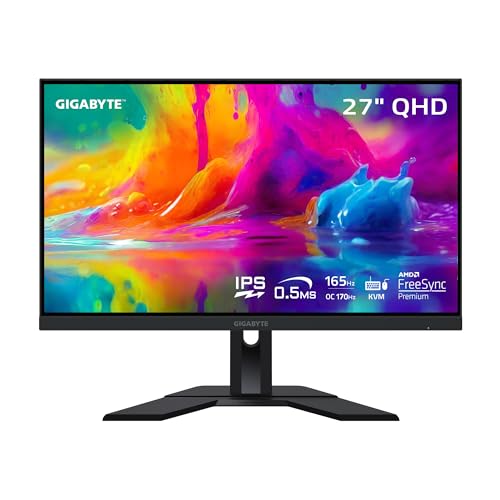
Feature Comparison
| Feature | LG 27UN850-W | Gigabyte M27Q X |
|---|---|---|
| Panel Size | 27 inches | 27 inches |
| Resolution | 3840 x 2160 (4K UHD) | 2560 x 1440 (QHD) |
| Refresh Rate | 60Hz | 240Hz |
| Panel Type | IPS | Fast IPS (SS IPS) |
| Response Time | 5ms GtG | 0.5ms MPRT |
| HDR | VESA DisplayHDR 400 | VESA DisplayHDR 400 |
| Color Gamut | 95% DCI-P3, 99% sRGB | 92% DCI-P3, 140% sRGB |
| Adaptive Sync | AMD FreeSync | NVIDIA G-Sync Compatible, AMD FreeSync Premium |
| Ports | 1x HDMI 2.0, 1x DisplayPort 1.4, 1x USB-C (90W PD), 2x USB 3.0, 1x 3.5mm audio | 2x HDMI 2.0, 1x DisplayPort 1.4, 1x USB-C, 2x USB 3.0, 1x 3.5mm audio |
| Ergonomics | Tilt, height (via optional stand) | Tilt (VESA mountable) |
LG 27UN850-W
Pros
- ✓USB-C with 90W power delivery for laptop docking
- ✓4K resolution for sharp text and detail
- ✓Wide color gamut (95% DCI-P3) for creative work
- ✓Clean, minimal design with thin bezels
- ✓HDR 400 support
- ✓Built-in speakers
- ✓VESA mount compatible
Cons
- ✗60Hz limits gaming appeal
- ✗No height adjustment on stand
- ✗Contrast typical for IPS
Gigabyte M27Q X
Pros
- ✓240Hz at 1440p for competitive gaming
- ✓Built-in KVM for dual-computer setups
- ✓Fast IPS with 0.5ms MPRT
- ✓92% DCI-P3 color gamut
- ✓USB-C with 18W power delivery
- ✓Affordable for 240Hz IPS
- ✓VESA mount compatible
Cons
- ✗BGR subpixel layout can affect text clarity
- ✗Stand has limited adjustability
- ✗No height adjustment on base model
Our Verdict
LG 27UN850-W
The LG 27UN850-W is an excellent 4K productivity monitor with standout USB-C docking. Perfect for MacBook and laptop users who want a single-cable setup. Color accuracy and 4K sharpness make it suitable for photo and video work.
Special Deal Available — See OfferGigabyte M27Q X
The Gigabyte M27Q X offers 240Hz 1440p IPS at a price that undercuts most competitors. The built-in KVM is a bonus for multi-PC users. Best value 240Hz IPS if you can live with the BGR subpixel layout for text.
20% Off — Limited Time, Check NowOur Methodology
We calibrate and test each monitor using a Calibrite ColorChecker Display Pro for color accuracy, OSRTT for response times, and standardized HDR test patterns. We measure input lag, evaluate ergonomic adjustability, and test gaming performance across multiple titles. No manufacturer has editorial influence.
Related Comparisons
Best Monitors 2026 – Top 10 Picks Tested
Our tested ranking of the best monitors for 2026. Gaming, productivity, and 4K picks based on calibrated testing of color, response time, and HDR.
OverviewCompare Monitors – Side-by-Side Specs & Prices
Compare 10 top monitors side-by-side. Specs, pricing, and key features for gaming and productivity monitors. Find the right fit for your setup.
CompareCompare MonitorPicks Products — Pick Two to Compare
Choose any two products to see a detailed side-by-side comparison. Compare specs, features, and value.
Head to HeadLG 27GP850-B vs LG 27UN850-W — Which Should You Buy?
Side-by-side comparison of LG 27GP850-B and LG 27UN850-W. We compare specs, performance, and value to help you decide.
Head to HeadLG 27GP850-B vs Gigabyte M27Q X — Which Should You Buy?
Side-by-side comparison of LG 27GP850-B and Gigabyte M27Q X. We compare specs, performance, and value to help you decide.
Head to HeadSamsung Odyssey G7 32" vs LG 27UN850-W — Which Should You Buy?
Side-by-side comparison of Samsung Odyssey G7 32" and LG 27UN850-W. We compare specs, performance, and value to help you decide.
Head to HeadSamsung Odyssey G7 32" vs Gigabyte M27Q X — Which Should You Buy?
Side-by-side comparison of Samsung Odyssey G7 32" and Gigabyte M27Q X. We compare specs, performance, and value to help you decide.